The Risk Rancher Field Manual, Ch. 8: Accepting Reality
Part of The Risk Rancher Field Manual, a hands-on guide to starting, scaling, and running a vulnerability management program.
Not every finding gets fixed, and not every finding gets fixed on time. Anyone who tells you otherwise is running a program on a slide, not inside a real company with deadlines and legacy systems and humans. The mark of a mature program is not zero unfixed findings. It is that every unfixed finding is unfixed on purpose, on the record, and on a clock.
There are two disciplined ways to say “not now.” The exception, for a thing that will not be fixed. The extension, for a thing that will, just later. We will file one of each, on findings from the queue you already built.
The exception: accepting the risk
Look at F010 from your triage: TLS 1.0 on legacy-billing, a P2. You cannot meet the 14-day clock, because sample-assets.csv tells you the real fix is a six-month application refactor. The host is hardcoded to old cipher suites. This is not laziness; it is a genuine constraint, and it is exactly what an exception is for.
Two rules make that decision honest instead of a cop-out.
First, you do not get to accept it. You are the security person. You lay the risk out plainly, what it is, what could happen, how likely. The business owner who owns the asset and will personally eat the consequences is the one who signs. For legacy-billing that is the Finance owner, not you. This is not you dodging responsibility; it is you refusing to quietly carry a risk that is not yours to carry.
Second, it goes in writing, with a reason and a date. Here is F010 filed in exception-log.csv:
| field | value |
|---|---|
| id | F010 |
| asset | legacy-billing |
| finding | TLS 1.0 / weak ciphers enabled |
| priority | P2 |
| reason cannot fix now | Fix requires a six-month application refactor; cannot meet the 14-day SLA. |
| compensating control | Restrict the billing host to the internal finance VLAN; alert on any external connection attempt. |
| business owner | Finance owner (from sample-assets.csv) |
| approved date | 2026-10-14 |
| expiry date | 2027-04-14 |
| status | open |
As it sits in the file:
id,asset,finding,priority,reason_cannot_fix_now,compensating_control,business_owner,approved_date,expiry_date,status
F010,legacy-billing,TLS 1.0 / weak ciphers enabled,P2,Fix requires a six-month application refactor; cannot meet the 14-day SLA.,Restrict the billing host to the internal finance VLAN; alert on any external connection attempt.,Finance owner,2026-10-14,2027-04-14,open
An exception tracked in an email thread is how you fail an audit, because the day someone asks who accepted this and why, you are spelunking through Slack. An exception with an owner’s name, a reason, a compensating control, and an expiry is how you pass one.
Exceptions expire
Here is the detail that separates a program from a graveyard: an accepted risk is not a closed finding. It is a deferred one, and it gets an expiry. Notice the dates in the row above, approved today, expires in six months. When the timer runs out, F010 comes back onto the active queue and the Finance owner has to look at it again with fresh eyes.
The world changes. The patch that did not exist now exists. The app that could not be touched got refactored last quarter. An exception that never expires is just a vulnerability you agreed, in writing, to forget, and forgetting is the exact opposite of the job.
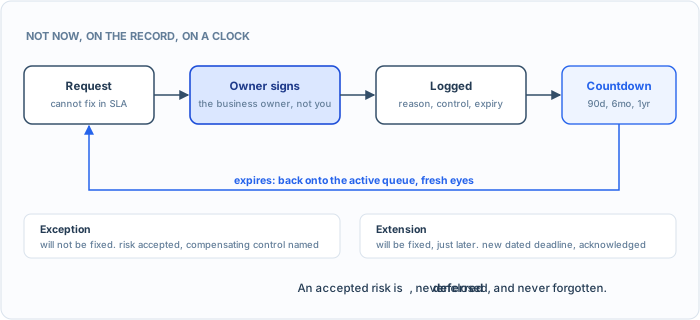
Not now, on the record, on a clock. The expiry is what keeps an accepted risk from becoming a forgotten one.
The extension: more time
The lighter cousin. IT is going to fix it, they just need more runway. Take F009, outdated OpenSSL on customer-db, a P2 with a 14-day clock. The team says it is slated for the next sprint, which lands eight days late. That is not an exception, the fix is coming, they just need the time. Grant it, record it, set the new date: due pushed from day 14 to day 22, acknowledged and signed. The only difference between an extension and simply blowing the SLA is that one is dated and the other is silence, and auditors can tell the two apart instantly.
Try it. File your own two. Put F010 into exception-log.csv with a compensating control you would actually stand behind, then pick one P2 or P3 from your queue, decide it needs two more weeks, and log it as a dated extension. If you cannot name a compensating control for the exception, that is a signal the risk may be too big to accept, which is the log doing its job.
Straight talk. Running exceptions and extensions out of email and a spreadsheet is, again, how you fail an audit. Risk Rancher keeps both on the record: an owner can request an extension from their ticket link, extensions are dated and capped by your SLA policy, and a risk-accepted finding is held as its own status, so the next scan neither quietly closes it nor re-tickets it, and every change lands in the audit log. The expiry is still a date you own. Put it in the exception log and in your calendar, because the tool will not reopen an accepted risk for you. It is free and it is permanently logged. You can absolutely do this by hand with the CSV above and a calendar reminder, and you should understand the process cold, because the discipline is what matters, not the thing that runs it.
The paper trail is the maturity
Exceptions and extensions are where your program meets reality, and, not coincidentally, where auditors meet your program. Done right, they turn “we did not fix it” from an embarrassing gap into a documented, owned, time-boxed decision. That is the difference between a team that is managing risk and a team that is hoping.
Look at what you have done with one sample file across three chapters: you triaged 29 raw findings into a ranked queue, turned the top one into a ticket with a verify step, and just deferred two more with an owner and an expiry, all of it on the record. That is the operating loop, by hand, start to finish. You know how every piece works because you ran each one yourself. Which means you have earned the right to stop doing the repetitive parts by hand. Part 4: scaling, and how to put the robot work down.