The Risk Rancher Field Manual, Ch. 9: Automating the Herd
Part of The Risk Rancher Field Manual, a hands-on guide to starting, scaling, and running a vulnerability management program.
Across chapters six, seven, and eight you worked one real file by hand: you triaged 29 raw findings into a ranked queue, turned the top one into a ticket with a verify step, and deferred two more with an owner and an expiry. You know how every step works because you did each one yourself. Which means you have finally earned the only honest version of this chapter: here is how to stop doing the parts that are not thinking.
You cannot scale a spreadsheet
The math is unforgiving. A person doing triage, routing, and tracking well can carry a certain number of findings a week. Your estate produces several times that, and the gap only widens as you grow. You cannot hire your way across it, either. More analysts copy-pasting cells is just more expensive copy-pasting, and it burns out good people on the dullest part of an otherwise interesting job.
And here is the thing: the parts that do not scale are exactly the parts that are not thinking. Pulling findings out of a scanner. Deduplicating the exact repeats. Recomputing severity against context you already defined. Routing a ticket to the owner you already named. Chasing status. That is robot work. Paying a skilled human to do robot work is not diligence; it is waste.
What is actually worth automating
Here is the list, with the hype filed off:
- Ingestion and deduplication. Pull findings continuously by API, or drop in the CSV exports yourself, and group them into logical units of work. It is not a scanner; you still point it at your scanners.
- Severity and the clock. You set the adjusted severity on each finding, from the rubric and the threat intelligence you provide, and the SLA clock follows from it. It runs air-gapped: it does not phone home to the CISA KEV catalog or EPSS in real time, because for a great many shops the only version allowed anywhere near their data is the one that never touches the internet.
- Routing. Rules that match a source, an asset, or a CVE assign the ticket to the right owner, with the SLA from your policy.
- Exceptions and extensions. Dated, capped extensions the owner can request from their link; risk-accepted findings held as their own status so a re-scan never quietly closes them.
- Metrics. The live view: a blended MTTR, what is overdue, and how findings resolved, patched or accepted or false positive. The next chapter.
And one more for the pentesters, covered back in chapter five: report intake on the way in, and a branded engagement report on the way out.
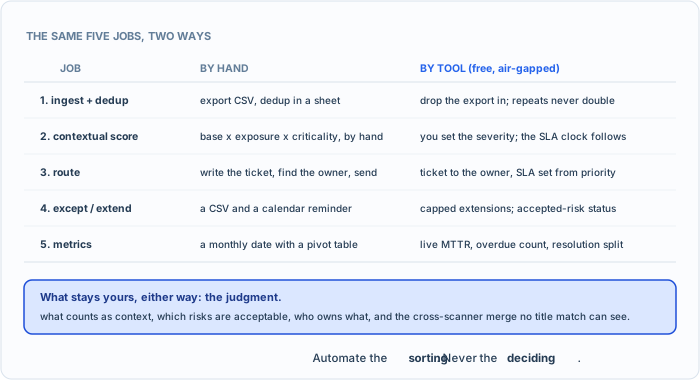
Same five jobs, two ways. The tool does the typing; the deciding stays with you.
Run the sample through it
Here is the honest test of everything above. Take the same sample-findings.csv you triaged by hand, and feed it to the free tool. It is a single Go binary, on GitHub:
git clone https://github.com/Kuebiko-LLC/riskrancher.git
cd riskrancher
go build -o rr ./cmd/rr
./rr
Open http://localhost:8080 and register the first user; that account is the admin. Then build the adapter once: Admin, Adapters, New, and map the file’s columns, title to title, asset to asset, severity to severity, description to description, remediation to remediation. Then Ingest: pick that adapter and upload sample-findings.csv. I ran your exact file through that same ingest path so the book is not selling you a story. Here is what it actually did:
| step | result |
|---|---|
| ingest 29 rows | 29 units of work created |
| severities | preserved: 7 Critical, 8 High, 8 Medium, 6 Low |
| exact re-upload of the same file | 0 new tickets, the dedup held (idempotent) |
| cross-scanner Log4j pair (F001, F002) | stayed 2 separate tickets, because the titles differ |
Read that last row, because it is the honest boundary. The tool killed the mechanical duplicate (upload the same file twice, no doubling) but it did not merge the Trivy and Nessus Log4j findings into one, because their titles are not identical. That is the exact judgment you made by hand in chapter six, and it is still yours. The tool does the typing; you do the thinking. Everything the tool produced, the units of work, the preserved severities, the dedup, matches what you built by hand, which is the point: automate the sorting you already understand, and keep the deciding.
Straight talk. This is the part of the book where I am supposed to hard-sell you the software. I am not going to, because I merged the paid tiers and made the whole thing free, and the reason is plain: I would rather more people did this work than paid me for the feeling of having done it. Risk Rancher runs the five jobs above, locally and air-gapped, from the scanner data and threat intel you hand it. If it helps, use it. If you would rather keep your spreadsheet, you now know exactly how to run the program without it, because you just did, on the same file. Either way, go do the work.
Automate the boring, keep the judgment
One line to keep you honest as you scale: automate the sorting, never the deciding. The tool can deduplicate, score, and route all day. It should not be the thing that decides what your context is, which risks are acceptable, or who owns what. Those are judgment, and judgment is the part of this job worth a human.
A program that tries to automate the thinking is worse than a spreadsheet, because it launders bad decisions through a machine and calls them objective. A program that automates only the typing is how you finally outrun the flood. Put the robot work down. Pick the judgment up. Then go find out whether any of it is actually working, which is a question of numbers.