The Risk Rancher Field Manual, Ch. 9: The Life of a Finding
Part of The Risk Rancher Field Manual, a hands-on guide to starting, scaling, and running a vulnerability management program.
Across chapters six, seven and eight you did every move by hand: sorted the pile, wrote the ticket, verified the fix, filed the exception. Each of those moves changed what a finding is: a row nobody has looked at, a ticket on somebody’s desk, a fix waiting to be checked, a risk somebody signed for. This short chapter names those states, draws the whole journey on one page, and says who acts at each step and where you look for it. By the end you will have a picture and a table you can keep open next to the tool in the next chapter, and the tool’s labels, “Pending Verification,” “Returned to Security,” will read as the moves you made by hand, with names on them.
A word first about words. This book has been saying finding for a row the scanner gave you, ticket for the finding once it is written up with an owner and a deadline, and unit of work for the thing you are actually going to fix, which may be several findings merged. The tool does not distinguish a finding from a ticket. In the tool every finding becomes a ticket the moment it lands, and the two words mean the same row. Keep the book’s distinction in your head, because the merges in chapter six are judgments the tool cannot make, but do not be thrown when the tool calls everything a ticket.
One finding, start to finish
Follow F001, Log4Shell on payments-api, the finding you ranked first and wrote the ticket for in chapter seven.
- It arrives. The scanner export is uploaded, F001 becomes a row in the queue with no owner and the triage clock running. The tool calls this state Waiting to be Triaged, and the queue it sits in is the Holding Pen. Nobody has decided anything yet.
- You look at it. You confirm it is real, you set the severity the way chapter six taught you, and you decide who owns it. The tool has an optional state for a finding you have looked at but not yet handed over, Triaged; most people skip straight to the next step.
- It is handed over. You assign F001 to Dana, who runs the payments team. The state becomes Assigned Out, it moves to the tab called The Chute (the chute is where cattle go to be worked, one at a time), the remediation clock is running, and Dana gets a link to her findings. No account, no login: the link is her inbox.
- Dana fixes it. She rebuilds the image with Log4j 2.17.1, pastes the pull request link as evidence, and clicks Submit Fix. The state becomes Pending Verification and the finding moves to the tab of the same name. This is the trust-but-verify step from chapter seven, waiting for you.
- You verify. You re-scan, the hole is gone, you click Verify. The state becomes Patched and the finding goes to The Archives. If the re-scan still finds it, you send it back for rework and it returns to Assigned Out with your note. The next scan can also do step 5 for you: when the same scanner covers the same host and F001 is simply gone, the tool closes it as Patched on its own.
That is the happy path, five steps, and most findings take it. Before the side paths, one name: the tool calls its administrator the Sheriff, and the Sheriff’s pages are the office where rules, users and the risk queue live. The full cast is a few paragraphs down. Three side paths exist because the world is not tidy.
- “Not mine.” Dana opens her link and one finding is on a box her team does not own. She returns it with a reason. The state becomes Returned to Security, the finding goes back to your Holding Pen with her note, sorted ahead of the others on its page, and you find the right owner. It is why the owner column in chapter two matters.
- “Not now.” Dana cannot make the clock and asks, from the same link, for more time or for the risk to be accepted, with her rationale. The state becomes Pending Risk Approval. This is chapter eight. The request shows up in the Sheriff’s office under Risk Reviews. The Sheriff reads it, adds what security verified, and clicks Copy Batch Link, which mints a link of a different kind for the approver (Finance, Legal, whoever signs for the business, not you). The approver opens it, sees Dana’s reason and the Sheriff’s note, and decides one finding at a time. Approving more time pushes the deadline by the days the approver enters (the default comes from Configuration) and sends the finding back to Assigned Out, counted against the cap your policy allows. Accepting the risk makes it Risk Accepted, archived with the approver’s name and an expiry date. Denying it, which the Sheriff can also do straight from Risk Reviews, sends it back to Dana as Assigned Out with the reason.
- “Not real.” You decide the finding is a false positive, as you did with F007 and F008 in chapter six. The state becomes False Positive, it is archived, and the same finding on every scan after lands already closed, until you withdraw the decision, at which point it comes back to the Holding Pen with a fresh clock.
And two things happen on their own, on a clock. When a Risk Accepted finding’s expiry passes, the next upload or restart puts it back in the Holding Pen with a fresh clock for a fresh look, which is the “exceptions expire” rule from chapter eight. And when a finding that was Patched shows up again in a later scan, it reopens into the Holding Pen with a fresh clock, which is the “reopens on its own” rule from chapter seven. The scan’s own closes and reopens are written into the finding’s history under the actor Scan, so a line never changes state without a line saying why. One edge to know: when a scan from the same scanner covers the same host and a finding is gone, it closes whatever state it was in, even one waiting for an approver; a host that drops out of the scan entirely is left alone.
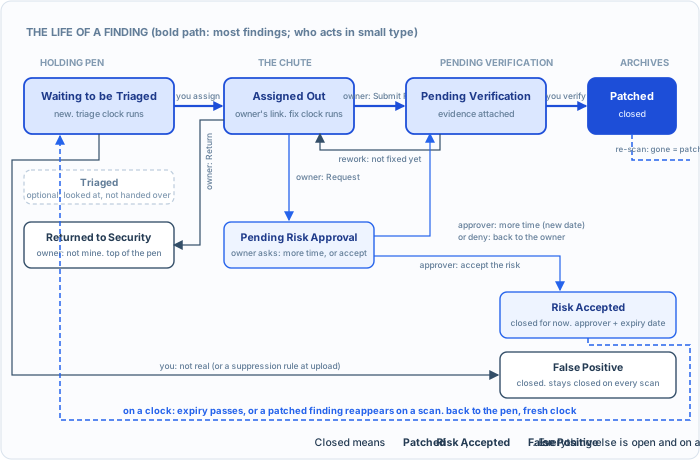
Every finding walks this map. The bold path is the one most take. The loops at the bottom are the two things that happen on a clock without anyone clicking.
The table to keep open
| State | In plain words | What puts a finding here | What moves it on | Who acts | Where you see it |
|---|---|---|---|---|---|
| Waiting to be Triaged | New, or back for a fresh look. Nobody has decided. | An upload; a Patched finding reappearing; an accepted risk whose expiry passed; a withdrawn false-positive call | You triage it and hand it over | You (the analyst) | Holding Pen |
| Triaged | Looked at, not yet handed over. Optional. | You mark it from the queue (or a script does, through the API) | You assign it | You | Holding Pen |
| Returned to Security | The owner says it is not theirs, with a reason. | The owner’s link: Return | You find the right owner and assign it | You | Holding Pen, ahead of the others on its page |
| Assigned Out | On somebody’s desk. The remediation clock is running. | You assign it, or a routing rule does; an approved extension; a denied request; rework after a failed verify | The owner fixes it, returns it, or asks for an exception | The owner | The Chute, and the owner’s link |
| Pending Verification | The owner says it is fixed, with evidence. Waiting for you to check. | The owner’s link: Submit Fix | You verify (Patched) or send it back (Assigned Out) | You | Pending Verification |
| Pending Risk Approval | The owner asked for more time or for the risk to be accepted. | The owner’s link: Request Exception | The approver decides, one finding at a time, from the link the Sheriff minted; or the Sheriff denies from Risk Reviews | The approver | Risk Reviews in the Sheriff’s office, and the approver’s link |
| Patched | Fixed and verified. Closed. | You verify; or the next scan no longer shows it | Reopens only if a later scan finds it again | Nobody, until a scan | The Archives |
| Risk Accepted | Deferred on the record, with an approver’s name and an expiry. Closed for now. | The approver accepts the risk | Expiry passes: back to Waiting to be Triaged | The clock | The Archives, with the date it comes back |
| False Positive | Not real. Closed, and stays closed on every scan after. | You log it, or a suppression rule matches it at upload | You withdraw the decision, and it comes back with a fresh clock | You | The Archives |
Three of the nine are closed states: Patched, Risk Accepted, False Positive. When the book says a finding is “closed,” it means one of those three, and when it says “back on the queue,” it means Waiting to be Triaged in the Holding Pen. When chapter seven’s diagram says the owner “says it is fixed,” the tool’s version of that is the owner’s Submit Fix, which does not close anything; it moves the finding to Pending Verification, because fixed is a claim and patched is a fact.
Two clocks run on every finding, and the book has mostly talked about one. The triage clock is how long a finding may sit in the Holding Pen before somebody decides about it. The remediation clock starts when it is assigned and is the deadline the owner works to, the one the SLA table in chapter six set and chapter seven applied. The Holding Pen shows the first as a countdown; the Chute shows the second as a due date, red when it has passed.
Who is who
The tool has five roles. The book has been using plainer words for the same people.
| The tool says | The book says | What they do |
|---|---|---|
| Sheriff | you, when you set things up | Runs the ranch: users, rules, the SLA matrix, the catalog, the Risk Reviews queue. The first account registered is the Sheriff. |
| RangeHand | you, the analyst | Triages the Holding Pen, assigns, verifies fixes, logs false positives. Most of this book is RangeHand work. |
| Wrangler | the owner | Fixes things. Dana. Works from a link; if given an account, sees only the findings assigned to them. |
| Magistrate | the approver, the business owner who signs | Approves or denies exceptions from the link the Sheriff sends. Has no page of their own and needs none. |
| Bounty Hunter | the pentester | Brings findings in through an engagement and takes a report back out; their home page is Engagements. Chapter five. |
The two links are the whole point of the last two rows. /share/<token> is the owner’s inbox: every finding assigned to them, with Submit Fix, Return, and Request Exception. It is minted when you assign findings out. /review/<token> is the approver’s desk: the request, the owner’s rationale, the Sheriff’s note, Approve and Deny. It is minted by the Sheriff from Risk Reviews. They are different kinds of link: an owner’s cannot decide and an approver’s cannot fix. Each lives at most ninety days and ends sooner, on its own, once the findings on it have left that person. Neither needs an account, which is how the people with the wrenches and the people with the signatures take part without ever learning your tool.
Severity, priority, and the one dial
This is where the book’s words and the tool’s words differ most, so read it twice. Chapter six gave you a priority, P1 to P4, computed from the scanner’s severity, the asset’s exposure and its criticality, with a KEV override. The tool has no priority field. It has one dial per finding, severity, with five settings: Critical, High, Medium, Low, Info, and its clock is set from that dial through the SLA matrix.
So the bridge is this: the priority is the dial. P1 is Critical, P2 is High, P3 is Medium, P4 is Low. When chapter two’s inventory is loaded, the tool sets the dial itself as each finding lands, with the same arithmetic you did by hand, and keeps the scanner’s own word beside it as the scanner severity; click the finding and the drawer shows the sum. A finding on an asset the tool does not know keeps the scanner’s word, and you move the dial by hand. Either way, what the dial says is the output of the rubric, not the scanner’s opinion. Then type the book’s clock into the matrix once, in Configuration (the Sheriff’s settings page): Critical 3 days, High 14, Medium 30, Low 90, so the tool’s deadlines are the ones chapter six set. The matrix has a row per severity and a copy per domain, the tool’s word for a kind of work; this book only ever uses the Vulnerability domain. The tool ships with a different default (14, 30, 60, 90), which is a reasonable policy for a shop that has not read this book; you have, so change it.
The KEV flag moves the dial. Load the catalog and every open finding that names a listed CVE goes to Critical, whatever the arithmetic or a rule says, with a line in its history that says the catalog load did it. The same kind of line, rescored, is written whenever an inventory load or a rubric change moves a finding, so a severity never changes without a sentence saying why.
Try it. On paper, before you ever open the tool. Take F001 and F010 from your answer key. For each, write the states it passes through from upload to the archive, the tab you would find it in at each step, and who acts. F001 is the happy path with a verify at the end. F010 is the exception from chapter eight. Then check against the table above. If your F010 ends in Risk Accepted with a date on it and comes back to Waiting to be Triaged when that date passes, you have the whole machine in your head.
You now know the names of everything the next chapter will show you on a screen. The states are the moves you made by hand, with labels. The tabs are the piles on your desk. The roles are the people you have been working with since chapter three. Part 4 is where the machine takes the typing, and you keep the deciding.
The answer to the exercise. F001: Waiting to be Triaged in the Holding Pen (you), Assigned Out in the Chute (you assign; Dana gets her link), Pending Verification in its own tab (Dana submits evidence), Patched in the Archives (you verify). Four states, three hands. F010: Waiting to be Triaged, Assigned Out to the Finance engineers, Pending Risk Approval (they ask from their link; it appears in Risk Reviews; the Sheriff mints the approver’s link), Risk Accepted in the Archives with the head of Finance’s name and 2027-04-14 on it, and on that date, Waiting to be Triaged again, in the Holding Pen, for a fresh look.